
Operations · Workforce & Access Governance
Who is on staff, what they can reach, and which systems that touches.
A workforce record carries the roles a person holds, whether they may reach ePHI, and the specific systems they can touch. One place, one answer, dated.
HIPAA mapping
Where this fits in the HIPAA rules.
5 provisions this capability contributes to, each with the specific Workforce & Access Governance behavior behind it. The obligation stays with your practice — the mapping shows which part of the work the platform carries.
§164.308(a)(3)Workforce security
Requires procedures for authorization or supervision, workforce clearance, and ending access when employment ends. The workforce record holds the roles, the ePHI flag and the service dates those procedures act on; writing and following the procedures is your practice’s work.
§164.308(a)(4)Information access management
Implements policies and procedures for authorizing access to ePHI. Role authorization and endpoint enforcement carry the technical half; the written authorization policy stays with your practice.
§164.312(a)(1)Access control
Implements technical policies and procedures to allow access only to authorized persons. The endpoint-level checks are those technical controls.
§164.312(a)(2)(i)Unique user identification
Assigns unique identifier for each user. Every workforce member has a unique account; no shared logins are permitted.
§164.502(b)Minimum necessary
Minimum necessary is a Privacy Rule obligation your practice defines in policy. Roles and the ePHI flag are how a definition gets enforced once you have made it; they cannot make the determination for you.
What it does
Access is a question about three things at once.
Ask a practice who can see patient records and the answer usually arrives in three pieces that live in three places: a list of staff in the payroll system, a sense of who does what, and a drawer of equipment nobody has counted since the last office move. The gap between those pieces is where access problems live — the hygienist who left in March whose login still works, the workstation at the nursing station nobody remembers approving, the contractor who was given the shared password because setting up an account seemed like a lot of trouble.
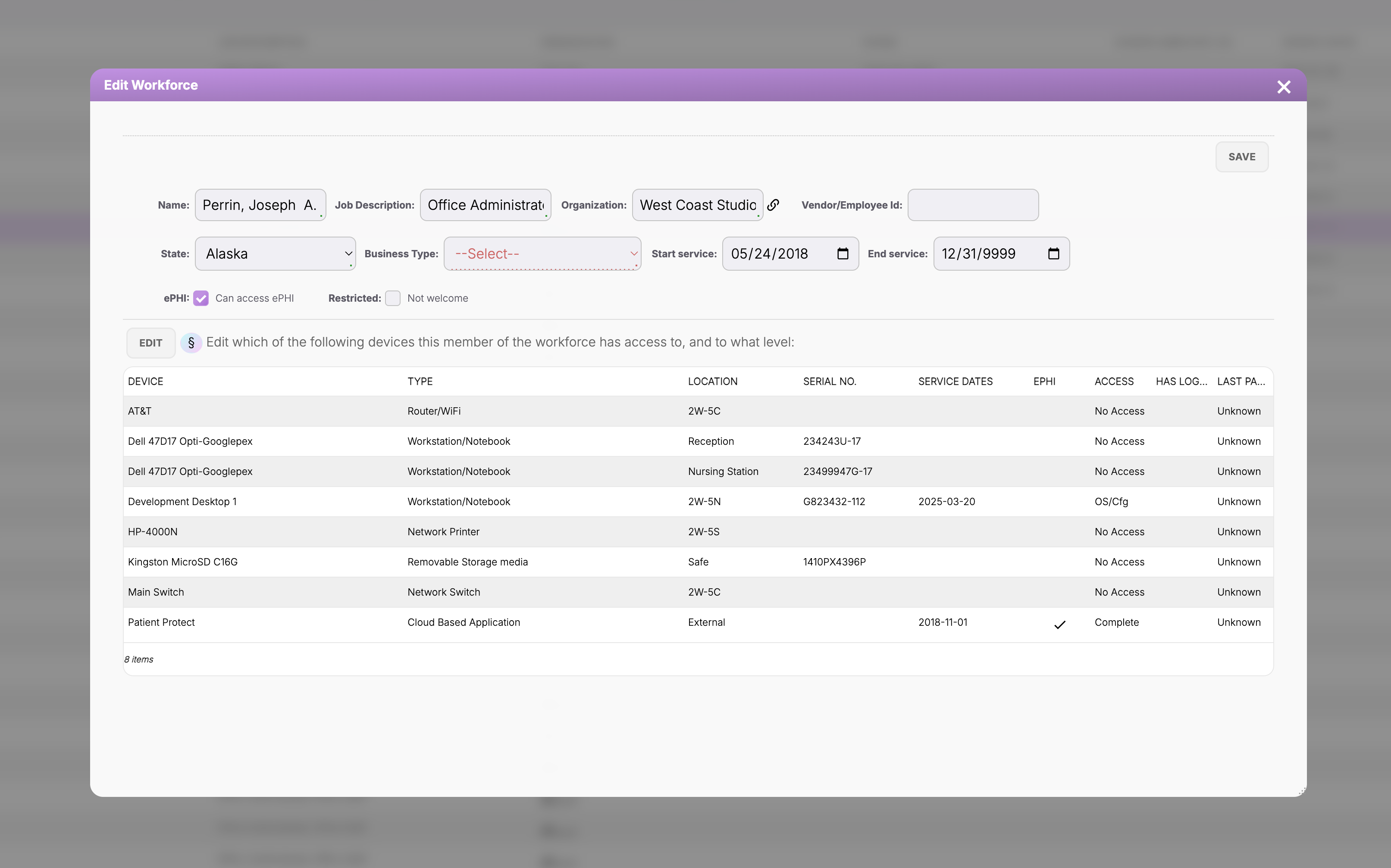
Workforce & Access Governance keeps the three together. Each person has a record: the roles they hold, whether they may reach ePHI, when their service started, and when it ends. Beneath that sits the practice's own inventory of systems and devices, and the record says which of those this person can touch and at what level. One screen answers the question an investigator actually asks, which is not “do you have a policy” but “show me who could have opened this record on that day.”
None of this discovers anything on its own. It is an inventory of what your practice has recorded, and it governs access to Patient Protect rather than to your electronic health record or your practice-management software. What it does is make the answer writable down, dated, and the same answer tomorrow.
How it works
8 mechanisms keep Workforce & Access Governance working.
Defined roles, assigned by function.
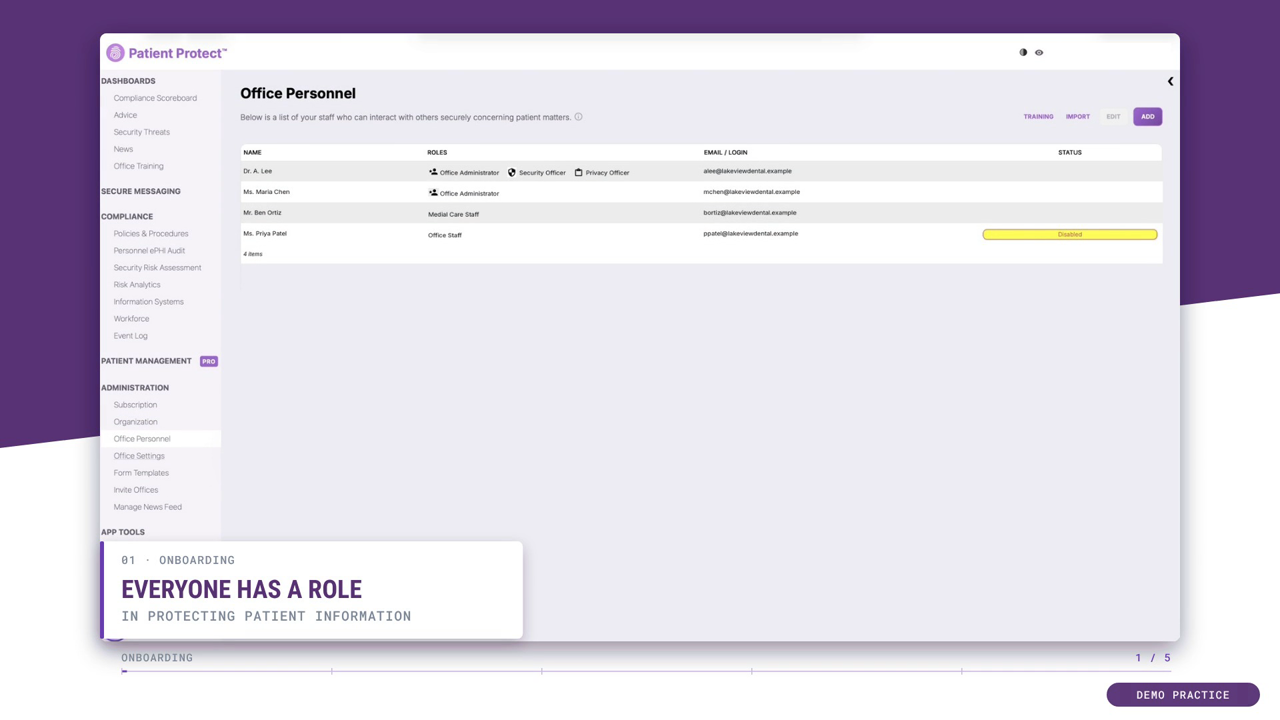
The roles are a fixed list rather than a builder, and they are named for the jobs a practice actually has — Office Administrator, Office Staff, Security Officer and Security Assistant, Privacy Officer and Privacy Assistant, clinical staff, and In Training. A person can hold more than one: a hygienist who is also the Privacy Officer is both, on one record, without a second login.
The role is checked where the content is served.
Access is decided on the server when a request arrives, not by hiding a menu item in the browser. What a role cannot reach does not come back in the response, so a person who knows the URL still gets nothing.
Changing access means changing the record.
There is no per-person exception to grant. Broadening what someone can reach means assigning them a role or clearing the ePHI restriction on their record — a change that lives in the record itself rather than in an administrator’s memory of a favor done last spring.
One person, one record, one account.
Personnel are added individually — name, job description, organization, an optional employee ID, and an email address that becomes the login. The ePHI audit then attributes each access to a named person rather than to “the front desk computer”, which is the whole point of §164.312(a)(2)(i).
An ePHI switch that does not require a role change.
Each workforce record carries its own “can access ePHI” setting and a separate restriction flag. A billing temp, a contractor, or someone in the middle of an investigation can keep doing their job with ePHI switched off, and switching it back on is one recorded change rather than a role reshuffle.
Service dates, and the leaver problem.
A workforce record carries a start-of-service date and an end-of-service date. Ending service is what §164.308(a)(3)(ii)(C) calls termination procedures, and it is the control practices fail most often — not because they decided to keep a leaver’s access, but because nobody owned the date. Here the date is a field on the record, so the question has an answer you can show.
An inventory of systems, not a spreadsheet of laptops.
Each entry carries what an auditor asks for: what it is, where it lives, its serial number, its service dates, and whether ePHI touches it. The types cover what a practice actually runs — workstations and notebooks, routers and switches, network printers, removable storage, and cloud applications, including Patient Protect itself. A device that goes out of service stays in the inventory rather than disappearing, because the question about a 2023 incident is answered by the equipment you had in 2023.
People joined to systems, with a level on each join.
The workforce record is where the two meet. For each person the inventory is listed row by row, and each row carries an access level rather than a yes or no — no access at all, operating-system or configuration access, or complete access. That is the difference between the office manager who can log into the reception workstation and the one who can reconfigure it, and it is the distinction §164.308(a)(4) is asking about when it says information access management.
Who this is for
Built for the practices that need it most.
Every practice.
Access management is foundational. There is no practice on Patient Protect that doesn't use it. The differentiator is how the controls hold up under stress — staff transitions, vendor relationships, shared workstations, audit inquiries.
Practices that have inherited messy permissions.
Practice acquisitions often arrive with ad-hoc permissions accumulated over years — the workforce member who got broader access during a project and never had it removed, the contractor who shared a login with the office staff. The platform's role model doesn't permit those patterns; migration onto the platform forces clean assignment.
Practices recovering from access-related incidents.
Post-incident, access tightening is typically required. The platform's architecture is what tight access looks like as a default; recovery is mostly about confirming role assignments are accurate.
What you get
6 outcomes you’ll feel in week one.
Roles named for real jobs.
A fixed list, and a person can hold more than one.
Checked on the server.
What a role cannot reach is not in the response.
No shared logins.
Unique user identification under §164.312(a)(2)(i) by architecture.
An ePHI switch per person.
Narrow the access without reshuffling the role.
Systems joined to people.
Device inventory with an access level on every join.
Dated from the start.
Service dates make the leaver question answerable.
Can I create custom roles?
Can one person hold more than one role?
How do I handle someone who only needs wider access for a while?
Do patients appear in the workforce record?
Does the inventory find devices on my network?
What happens to a device when we retire it?
What it does not do.
- Governs access to Patient Protect, not to the practice's other systems
- No published role count — the architecture is the point, not an arbitrary number
Continue exploring
Related features in the platform.
Defense
ePHI Audit
The question after an incident is never abstract. It is whether one named person opened one named record on one particular afternoon, and whether you can show it.
Learn moreOperations
HIPAA Foundations Training
HIPAA training inside the platform, with every completion recorded as it happens. The first documentation an auditor asks for, produced by doing the training rather than assembled afterwards.
Learn moreNetwork
Patient Management
Your EHR holds the clinical story. The administrative one — who this patient is to your office, what has passed between you, what is still outstanding — usually holds together only in somebody's head.
Learn moreOne record for who is on staff, what they reach, and which systems that touches.
Most practices have their roster, their roles and their system inventory recorded inside the first week. The leaver question has an answer from then on.