
Defense · ePHI Audit
Pick a person. See what they opened.
The question after an incident is never abstract. It is whether one named person opened one named record on one particular afternoon, and whether you can show it.
HIPAA mapping
Where this fits in the Security Rule.
4 provisions this capability contributes to, each with the specific ePHI Audit behavior behind it. The obligation stays with your practice — the mapping shows which part of the work the platform carries.
§164.312(b)Audit controls
Requires mechanisms that record and examine activity in systems containing ePHI. Access inside Patient Protect is recorded by workforce member, action and time, and the record is examinable from the interface rather than by requesting an export from someone.
§164.308(a)(1)(ii)(D)Information system activity review
Requires procedures to regularly review records of system activity. Regularly is your practice's word to define, and the review is your practice's act. What this provides is a log that can actually be read by the person who has to do the reviewing.
§164.308(a)(3)(ii)(A)Authorization and supervision
An addressable specification covering supervision of workforce members who work with ePHI. Supervision that produces no record is difficult to evidence, and per-person access history is the record it produces.
§164.316(b)(2)Time limit
Requires six-year retention of the documentation this subpart requires — policies, procedures, actions, activities and designations. It is worth being precise: this is not a rule that raw access logs must be kept for six years, and any vendor telling you otherwise has read the provision quickly.
What it does
The question always arrives about one person and one record.
A patient calls and says they think someone at the practice looked at their chart. A workforce member leaves under a cloud. A laptop goes missing and you need to know what was reachable from it. In every one of those, the useful question is narrow and specific — did this person open this record, and when — and it is the question a practice with no log cannot answer at all.
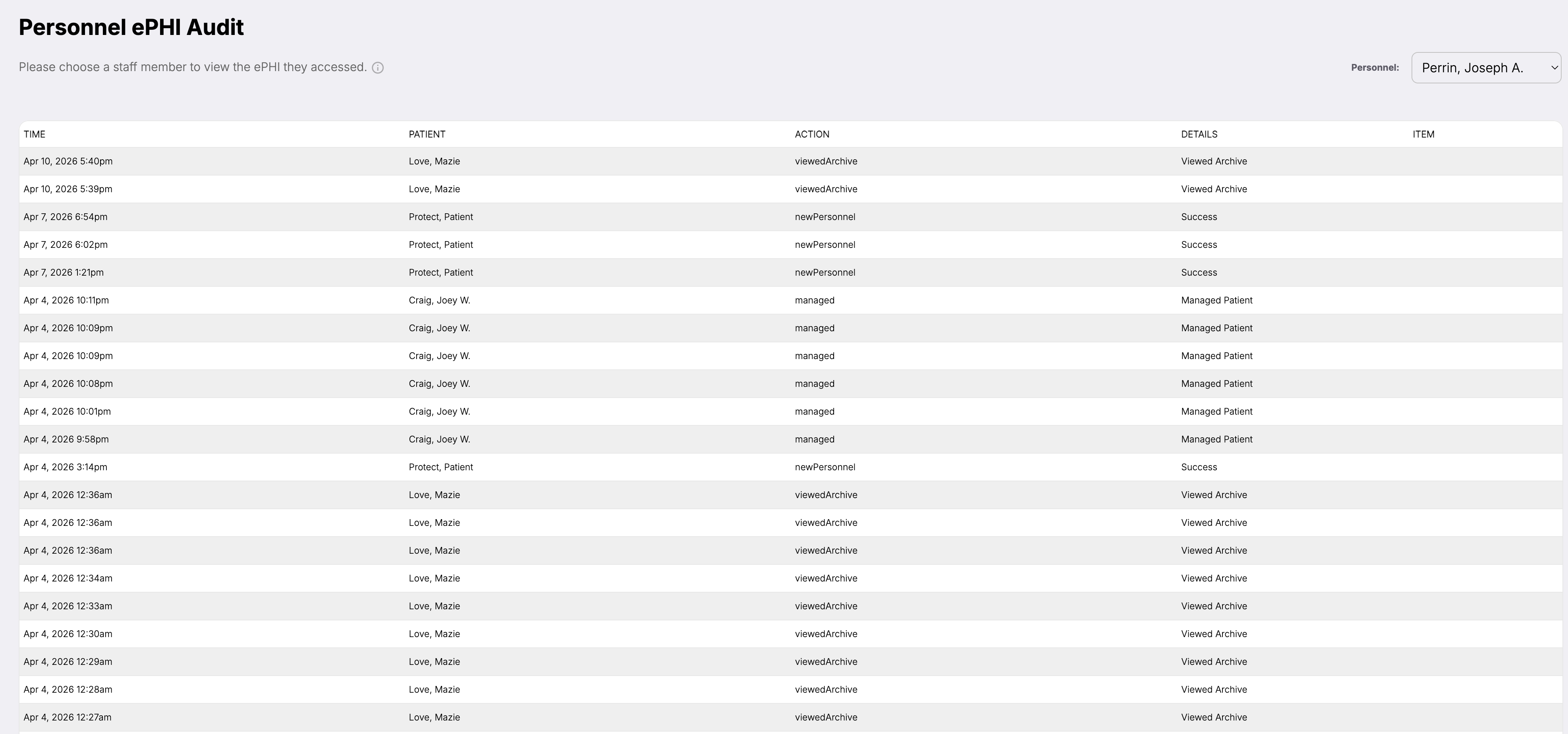
The ePHI Audit answers it in the shape the question is asked. You choose a workforce member, and what comes back is the patient information they reached: the time it happened, whose record it was, what they did, and the detail of that action. Not a stream of system events to be filtered down, but a per-person history you can read.
The scope is worth stating plainly, because it is where most audit-log marketing goes wrong. This records activity inside Patient Protect. It does not see your electronic health record, your imaging system, or the workstation at the front desk — no product hosted elsewhere can watch software running on your premises. What it covers, it covers by name.
How it works
6 mechanisms keep ePHI Audit working.
Per-person, not per-system.
The screen starts by asking which staff member you mean, because that is how the question arrives. Most audit tooling starts from a firehose and asks you to filter your way down to a person, which works if you are a security analyst and does not if you are the office manager trying to answer a patient by Friday.
Patient context on the row.
Each entry names whose information was involved rather than only what screen was opened. “Viewed archive” tells you nothing on its own; “viewed archive, Love, Mazie, 5:40pm” is an answer. The pairing of person and patient is what makes the log usable in the conversation you are actually going to have.
Actions recorded as what happened.
Entries carry the action taken — viewing an archived record, managing a patient, adding personnel — with a result beside it. The vocabulary is the product's own rather than a generic create-read-update-delete, which means a reviewer can tell a routine action from an unusual one without a decoder ring.
Timestamps to the minute, in sequence.
Every row carries the date and the time. Access at 12:27am reads differently from access at 2:15pm, and a run of eleven views in nine minutes reads differently from eleven views across a week. Sequence is most of what an investigation is looking at.
Attribution that survives the shared workstation.
The log names a workforce member because access requires an individual account, and every person on the roster has one. This is the practical value of §164.312(a)(2)(i)'s unique user identification: without it a log records that “reception” opened a chart, which is not attribution and will not satisfy anyone asking.
Exportable when it stops being an internal matter.
The record can be taken out of the platform for an investigation, a regulator, or your counsel. What it cannot do is arrive pre-formatted for OCR, because there is no OCR log format — that claim is common and it is not true. What matters is that the underlying record exists and is legible, which is the part that cannot be created after the fact.
Who this is for
Built for the practices that need it most.
Practices that will get the phone call.
Every practice does eventually — a patient who suspects, a rumour about a colleague, a departure that ends badly. The practices that come out of it well are not the ones with better policies. They are the ones who could answer within a day.
Specialties where a look is the harm.
Behavioral health, substance use, reproductive health, HIV care. In these settings unauthorized viewing is itself the injury, not a precursor to one, and the ability to establish who opened a record is not administrative housekeeping.
Practices under a corrective action plan.
After an enforcement action, demonstrating that audit controls function is usually an explicit obligation. A log that exists and is readable is the evidence; a policy saying you intend to log is not.
What you get
5 outcomes you’ll feel in week one.
Starts from a person.
Choose a staff member and read their history.
Names the patient.
Whose record it was, not only which screen.
Timed to the minute.
Sequence is most of what an investigation reads.
Attributable by design.
Individual accounts mean the log names a person.
Exportable.
It leaves the platform when the matter does.
Can I see everything one workforce member has done?
Does this cover our EHR and our other systems?
Can the log be altered?
Does this satisfy a patient's request for an accounting of disclosures?
How long is the history kept?
Will a large practice's log become unusable?
What it does not do.
- Never 'immutable' or 'tamper-proof' — those need storage-layer evidence nobody has produced
- Producing a log is not reviewing it; §164.308(a)(1)(ii)(D) asks the practice to review
Continue exploring
Related features in the platform.
Operations
Workforce & Access Governance
A workforce record carries the roles a person holds, whether they may reach ePHI, and the specific systems they can touch. One place, one answer, dated.
Learn moreOperations
Compliance Evidence & Records
The question is almost never whether the practice did the work. It is whether the practice can produce what the work generated — and do it this week rather than after a month of archaeology.
Learn moreDefense
Security Alerts
The BAA that lapsed while the vendor kept working. The policy nobody adopted. The training assignment that never got made. Conditions do not announce themselves, and the practice that finds out during an investigation found out too late.
Learn moreOne person, one record, one afternoon. Answerable.
The log cannot be created after you need it, which is the entire argument for having one before you do.