
Operations · HIPAA Foundations Training
Training delivered. Completion documented. Audit trail automatic.
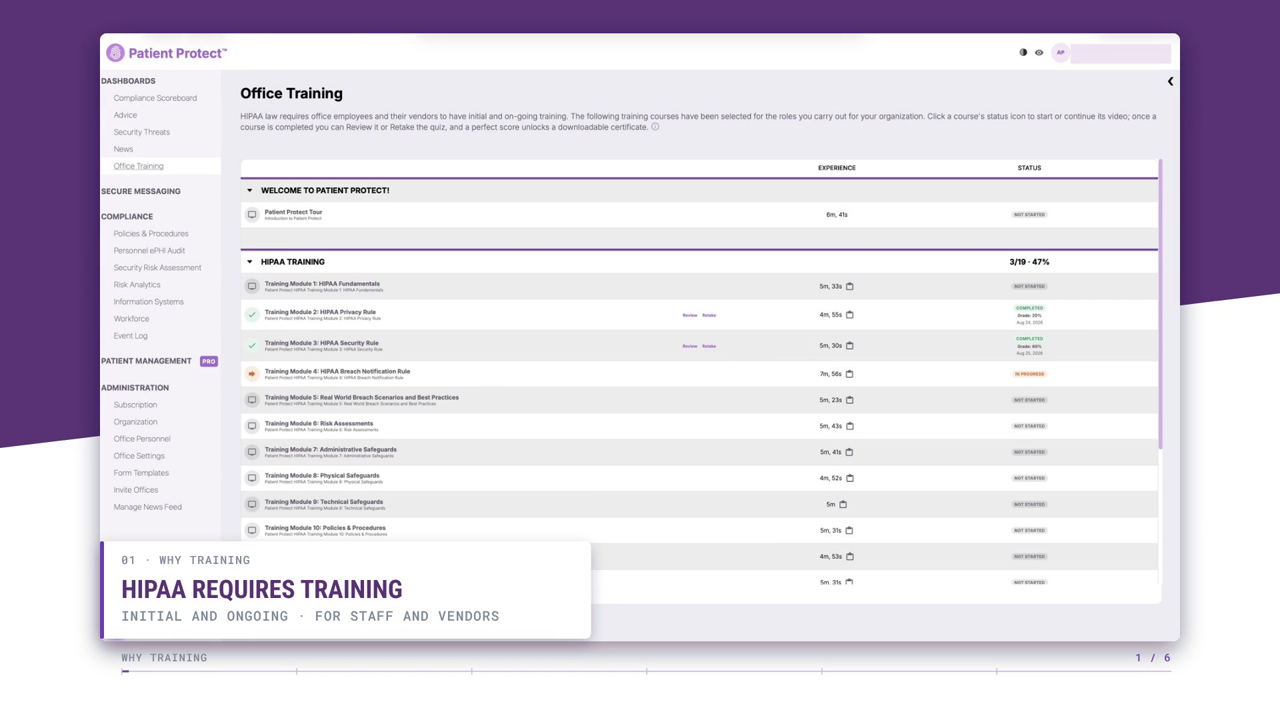
HIPAA training inside the platform, with every completion recorded as it happens. The first documentation an auditor asks for, produced by doing the training rather than assembled afterwards.
Basic: All 19 HIPAA Foundations modules. Pro: The Foundations modules today; the advanced series is in development and is not part of what Pro buys yet.
HIPAA mapping
Where this fits in the HIPAA rules.
4 provisions this capability contributes to, each with the specific HIPAA Foundations Training behavior behind it. The obligation stays with your practice — the mapping shows which part of the work the platform carries.
§164.308(a)(5)Security awareness and training
Implements security awareness and training programs for all workforce members. The Security Rule's specific training requirement.
§164.530(b)Privacy Rule training
Trains all members of the workforce on policies and procedures with respect to PHI. The Privacy Rule's parallel requirement.
§164.316(b)(1)Documentation standards
The Security Rule's documentation standard requires a written or electronic record of an action or activity it requires, and running a training program is such an activity. Worth being precise, because the express requirement to document training is the Privacy Rule's at §164.530(b)(2)(ii), retained six years under §164.530(j). The platform keeps the records; the policies are yours.
§164.316(b)(2)Time limit
Six-year retention. Training records persist through workforce member tenure plus retention.
What it does
The training documentation auditors actually ask for.
Training is the most-checked compliance element. It's also the most-failed. Practices that have done extensive training but can't produce dated, timestamped completion records get the same enforcement treatment as practices that did no training at all. The training itself is necessary; the documentation is what survives audit.
Patient Protect's training system handles both. The HIPAA Foundations series is 19 focused video modules with 95 knowledge-assessment questions; the platform delivers it in-context, scores each learner, and records every completion as audit-ready evidence. The first five modules are free at patient-protect.com/free-hipaa-training. The first time an auditor asks “show me your training records,” the answer is one export.
The completion log is the audit-ready evidence. Who completed what, when, with what score. Filterable by workforce member, by module, by date. Exportable as the file OCR auditors expect to receive. Every certificate carries a unique QR code that opens an independently verifiable record — the shift from “compile the training records before audit” to “the training records are already compiled” is the operational change.
How it works
4 mechanisms keep HIPAA Foundations Training working.
Role-based curriculum assignment.
Training is assigned to named workforce members rather than announced to a room, so the record afterwards says who was assigned what. Worth being exact about the limit: assignment is something a person does, and the platform does not rewrite a curriculum on its own when a role changes.
HIPAA Foundations plus advanced series as released.
Basic includes the HIPAA Foundations series in full — 19 focused video modules, roughly 1 hour 45 minutes of instruction, 95 assessment questions. That is the whole curriculum, not a sample of it. The advanced series that Pro will add is still in development; nothing in it is available today, on either plan.
Quizzes that test comprehension.
End-of-module quizzes are scored. A passing score is required for completion, and a failed attempt permits a re-take. The score is kept with the completion record, so a training log shows comprehension was tested, not just that a video finished playing.
Completion timestamps and attribution.
Every completion records the workforce member, the module, the completion timestamp and the quiz score. That is the artifact an auditor asks for, and it is produced by finishing the module rather than assembled afterwards.
Who this is for
Built for the practices that need it most.
New practices building from scratch.
The default curriculum gets a new practice to “trained workforce” on day one. New hires complete onboarding before they touch ePHI; existing workforce gets refreshers on the platform's cadence.
Practices with training history somewhere else.
The platform records what happens in it, from the point you start using it. Earlier completions recorded elsewhere stay where they are — there is no import that pulls a prior provider's history in, and a page that implied otherwise would be setting up a bad surprise during an audit.
Practices that need more than general HIPAA training.
Be honest about the fit: the Foundations curriculum is general HIPAA training. Specialty material — 42 CFR Part 2 for behavioral health, age-specific privacy for pediatrics — is the advanced series, which is in development and is not part of what any plan buys today.
Practices that have ever lost a training record.
Lost training records are a common audit failure. Completions are retained under access controls for the regulatory window, so the record exists when somebody asks for it rather than being reconstructed from memory.
What you get
6 outcomes you’ll feel in week one.
Audit-ready by default.
Training records timestamped, attributable, and held under access controls for the retention period. The first thing OCR asks for, ready when they ask.
Role-based curriculum.
Each role gets training calibrated to their function.
Comprehension verification.
Quizzes confirm understanding, not just attendance.
Automatic refreshers.
Annual cadence (configurable) keeps training current.
One training record per person.
Assignment, completion and the quiz score land in one record.
Basic: all 19 HIPAA Foundations modules. Pro: the same 19 plus the expanded series, added as released.
Sector-specific depth for practices that need more than generic content.
How long does the training take?
Can workforce members re-take a module?
What if our practice has a custom training program?
Can I see who's behind on training?
Is the training current with regulatory changes?
What is the difference between Basic and Pro training?
What it does not do.
- Assignment is not completion, and completion is not a discharged §164.530(b) obligation
Continue exploring
Related features in the platform.
Operations
Workforce & Access Governance
A workforce record carries the roles a person holds, whether they may reach ePHI, and the specific systems they can touch. One place, one answer, dated.
Learn moreOperations
Compliance Evidence & Records
The question is almost never whether the practice did the work. It is whether the practice can produce what the work generated — and do it this week rather than after a month of archaeology.
Learn moreIntelligence
Compliance News
A modest thing done properly: enforcement and breach news on the same screen as your compliance queue, refreshed daily, with an office setting for what the feed carries.
Learn moreTraining delivered. Completion documented. Audit trail automatic.
New hires complete onboarding before they touch ePHI, and what they finished is recorded as they finish it rather than reconstructed later.