
System · Autonomous Compliance Engine
Compliance tasks that close themselves.
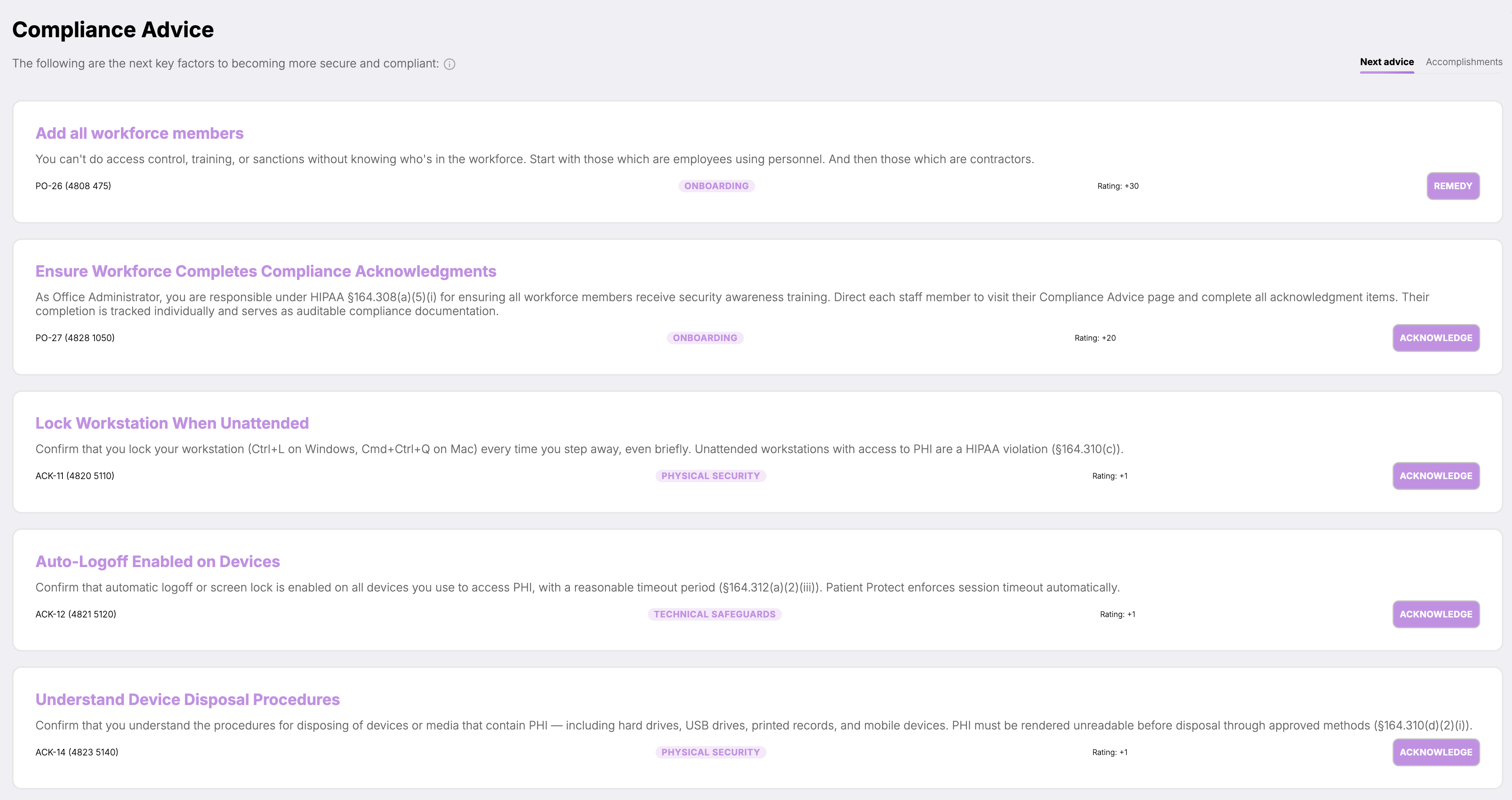
Your practice state produces the next thing worth doing — from the assessment, but also from a lapsing BAA, a policy change, a new workforce member. Work closes when its conditions are met, and closing it changes the state.
HIPAA mapping
Where this fits in the Security Rule.
5 provisions this capability contributes to, each with the specific Autonomous Compliance Engine behavior behind it. The obligation stays with your practice — the mapping shows which part of the work the platform carries.
§164.308(a)(1)Security management process
Implement policies and procedures to prevent, detect, contain, and correct security violations. The engine is the operational layer of that process.
§164.308(a)(1)(ii)(A)Risk analysis
Conduct an accurate and thorough assessment of risks. The SRA feeds the engine; the engine never lets the risk picture go stale.
§164.308(a)(1)(ii)(B)Risk management
Implement security measures sufficient to reduce risks to a reasonable and appropriate level. The engine drives the implementation through prioritized tasks.
§164.308(a)(8)Evaluation
Perform periodic technical and non-technical evaluations. The engine evaluates continuously, not periodically.
§164.316(b)Documentation requirements
Maintain written records. Every task closure is timestamped, attributed, and held under access controls for the retention period.
What it does
A queue that stays useful.
Most compliance platforms hand you a checklist. You work the checklist. You forget the checklist. You scramble before audit.
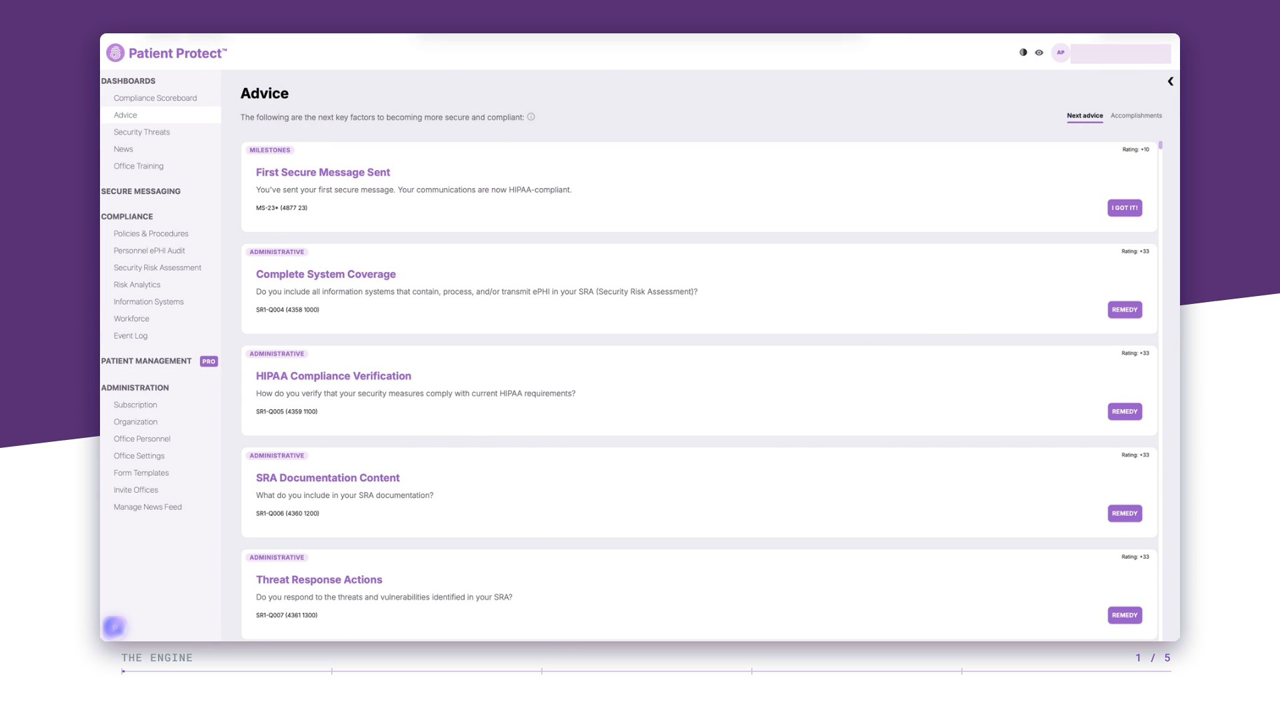
Patient Protect's compliance engine doesn't hand you a list — it generates one, from your actual SRA results, prioritized by real risk, with conditions the platform monitors. When a condition is satisfied, the task closes itself. The work stays current because the system never sleeps on it.
The result is a queue that reflects where you actually are, not where you were last quarter. New risks generate new tasks. Resolved risks close their tasks. The list is alive.
How it works
5 mechanisms keep Autonomous Compliance Engine working.
SRA-driven generation.
Every task in the queue traces to a specific SRA finding. Open a task and you can see which question, which response, and which risk score generated it. Auditors asking “why did you do this?” get an answer in one click.
Priority by real risk.
High-impact, high-likelihood risks surface first. Prioritization is not subjective — it comes from your assessment data, scored against industry-standard risk frameworks.
Self-closure on condition match.
Tasks include the conditions that satisfy them. When a policy is adopted, a device is encrypted, a BAA reaches Active state, training completes — the task closes automatically. You don't claim completion; the system observes it.
Cascading task generation.
Some tasks unlock others when they close. Adopting an encryption policy triggers device-level encryption tasks across your inventory. Completing training unlocks role-specific advanced modules. The queue grows and shrinks based on what you've done.
Audit-ready by default.
Every task closure produces an evidence record — date, time, who, what changed, what condition was satisfied. Export the evidence in the format OCR auditors expect, or hand it to a consultant for review. The work documents itself.
Who this is for
Built for the practices that need it most.
Practices without dedicated compliance staff.
If compliance is one job among many for your office administrator, the engine is the difference between a program that holds together and one that doesn't. The work surfaces when it needs to. Closures happen in the background. The audit trail builds itself.
Practices with consultants.
If you work with a HIPAA consultant, the engine becomes their working surface. They see what's open, what's been completed, and what's behind. Collaboration on a single source of truth — not email threads and spreadsheets.
Practices preparing for OCR or insurance audits.
When the auditor asks for documentation, the engine produces it. Not a binder you assembled the week before. A timestamped, attributable evidence record generated by the work itself.
What you get
6 outcomes you’ll feel in week one.
No more manual checklists.
The engine generates and maintains the list. You work the queue; you don't manage it.
Risk-prioritized work.
The most important tasks rise to the top automatically. You're not deciding what to do next — the system already has.
Self-closing tasks.
Conditions met means task closed. No one forgets to check the box. No closure event is undocumented.
Audit evidence by default.
Every closure is timestamped, attributed, and held under access controls for the retention period. Your audit trail builds itself while you do the work.
Always current.
The queue reflects right now, not last quarter. New risks generate new tasks; resolved ones close.
Zero maintenance overhead.
The engine is part of the platform. No setup beyond your SRA. No configuration to keep running.
Do I need to complete the SRA before tasks generate?
What if I disagree with a task's priority?
Can tasks be assigned to specific staff members?
How do tasks close automatically?
What if my SRA results change?
Is this AI-driven?
Continue exploring
Related features in the platform.
System
Risk Intelligence
Likelihood against impact, item by item, so a 331-question assessment comes back as a ranked list rather than a document.
Learn moreSystem layer
Patient Protect Score
The Live Patient Protect Score updates as the engine closes tasks. Always current, never quarterly.
Learn moreIntelligence
Audit Replay TimelineIn development
In development. The evidence it would read — who opened what, when, and what state changed around it — is being recorded today; assembling it into a sequence on demand is the part we are building.
Learn moreSee it running on your SRA in 90 minutes.
Most practices have their first auto-generated task queue within 90 minutes of starting. Most have their first auto-closure inside the first week.