
Intelligence · ePHI Data Flow Mapper
Draw where the information goes. The gaps show up on their own.
A free tool, in your browser, with no account. Place your systems and vendors, connect what talks to what, and the connections nobody has papered become the ones you are looking at.
HIPAA mapping
Where this fits in the HIPAA rules.
3 provisions this capability contributes to, each with the specific ePHI Data Flow Mapper behavior behind it. The obligation stays with your practice — the mapping shows which part of the work the platform carries.
§164.308(a)(1)(ii)(A)Risk analysis
Requires an accurate and thorough assessment of risks to ePHI you create, receive, maintain or transmit. Accurate and thorough is hard to claim when nobody has written down where the information goes — a map is not the analysis, but an analysis built without one is guessing.
§164.502(e)(1)Business associate assurances
Requires satisfactory assurances before a business associate handles PHI on your behalf. The map's usefulness is that it makes the unpapered connections visible as connections rather than as an absence in a folder somewhere.
§164.308(a)(7)(ii)(E)Applications and data criticality analysis
An addressable specification asking which applications and data are critical. Seeing which node everything routes through tends to answer it faster than a meeting does.
What it does
Nobody has ever drawn it, which is why nobody knows.
Ask a practice to list where patient information ends up and you get the EHR, the billing service, and then a pause. The pause is where the real answers are: the scheduling tool the front desk signed up for, the transcription service somebody trialled, the backup that copies everything daily to a place no one has thought about in two years. Not because anyone was careless — because it accumulated one decision at a time and was never assembled into a picture.
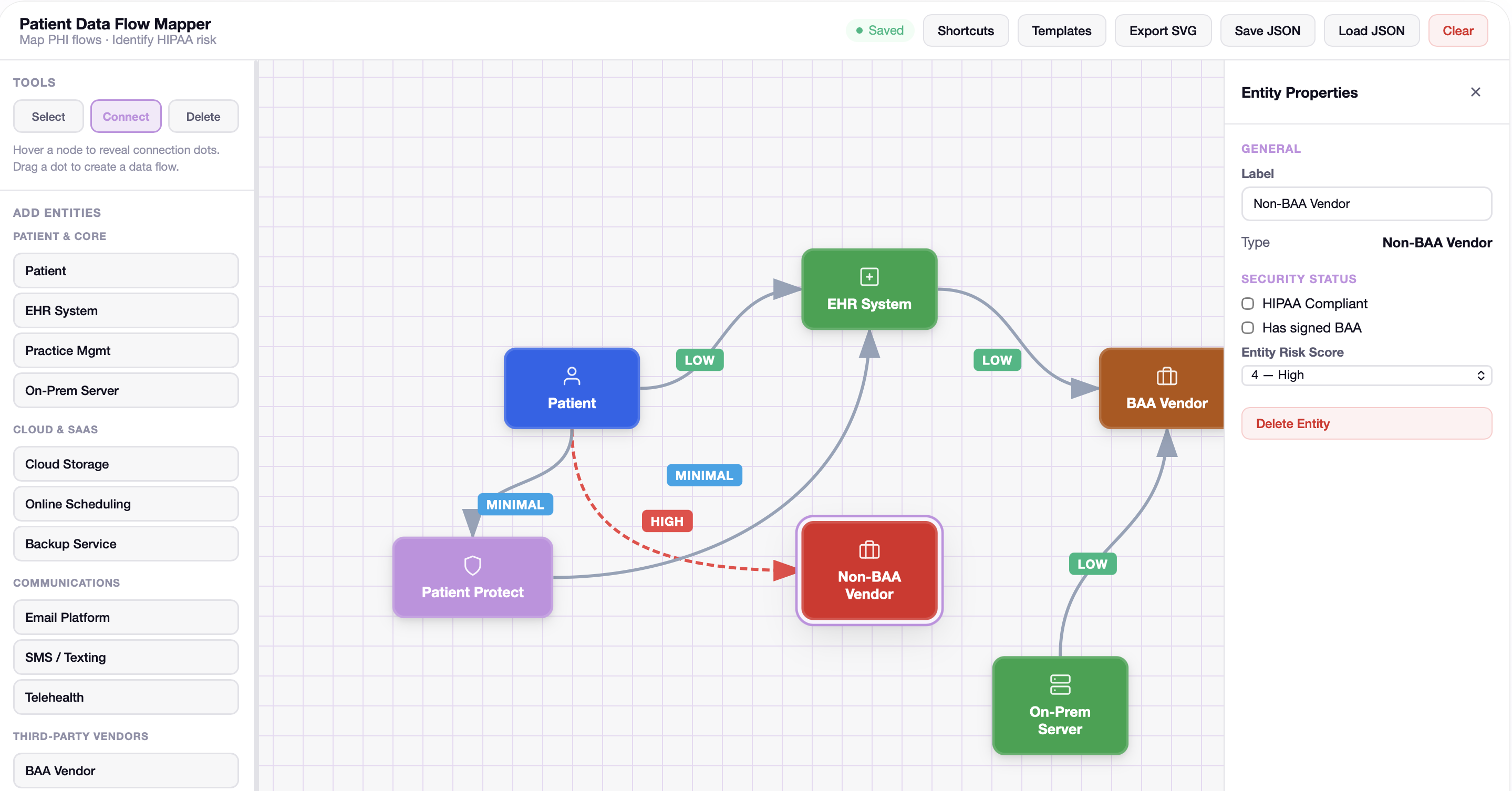
The Data Flow Mapper is a canvas for assembling it. You place the things your practice actually uses — the patient, the EHR, the on-premises server, cloud storage, scheduling, email, texting, telehealth, your vendors — and you connect what talks to what. It takes about twenty minutes and it is free, in the browser, with no account.
What makes it more than a diagram is that each entity carries whether it has a signed BAA, and each connection carries how much exposure it represents. A vendor with no agreement stops being an item you have not got round to and becomes a red line on a page you are looking at. That reframing is the entire product.
How it works
5 mechanisms keep ePHI Data Flow Mapper working.
A palette of what practices actually run.
The entities are not abstract boxes. Patient, EHR system, practice management, on-premises server, cloud storage, online scheduling, backup service, email platform, SMS and texting, telehealth, and vendors split into those with a BAA and those without. Starting from a real vocabulary is why people finish the exercise instead of abandoning a blank canvas.
The BAA question is asked per entity.
Each entity has a properties panel with a signed-BAA setting and a HIPAA-compliant setting, kept as separate questions. They are separate because they are separate: a vendor can be perfectly well run and still have no agreement with you, and an agreement is not a statement about how well run they are.
Connections carry exposure, and the bad ones look bad.
Each flow is labeled by how much it carries — minimal, low, high — and a high-exposure flow to a vendor with no agreement draws as a red dashed line. The design decision worth noticing is that the map does not put that in a report. It puts it in the picture, where somebody scanning the page for ten seconds sees it.
It is yours, and it leaves in a file.
The map saves and loads as JSON and exports as SVG, so it goes into a risk analysis, a board pack or a folder for the next audit. It is a document you own rather than a thing that lives in an account you would have to keep paying for.
No account, and nothing is collected.
The tool runs in your browser and asks for no signup. Which also means you can put your real systems and your real vendors on it, and that matters — a mapping exercise done with placeholder names because you did not trust the website is a mapping exercise you have to do again.
Who this is for
Built for the practices that need it most.
Practices starting a risk analysis.
The assessment asks where ePHI is created, received, maintained and transmitted. Most practices answer from memory. Twenty minutes with a canvas produces a better answer and an artifact you can attach.
Practices that suspect they have vendors nobody papered.
Almost every practice does. Drawing it is the cheapest way to find out, and considerably less awkward than discovering it during an investigation.
Practices explaining themselves to somebody else.
A payer, an acquirer, a partner's security review. One page showing where information moves does more than a policy binder, and it does it in the first minute of the meeting.
What you get
5 outcomes you’ll feel in week one.
Free, no account.
In the browser, so you can use your real system names.
A real vocabulary.
Scheduling, texting, telehealth, backup — what practices actually run.
BAA status per entity.
Kept separate from whether a vendor is well run.
Gaps drawn, not reported.
A high-exposure flow with no agreement is a red line on the page.
Exports as a document.
SVG and JSON, so it goes into the risk analysis you were doing anyway.
Is this included in a subscription?
Does it connect to our systems or read our data?
Will data flow mapping be built into the platform?
Is a data flow map the same as a risk analysis?
How long does it take?
What it does not do.
- A free public tool. Its existence is not evidence that mapping is integrated into the platform.
- It is not a Basic or Pro entitlement and no page may imply a subscription reaches it
Continue exploring
Related features in the platform.
Operations
Workforce & Access Governance
A workforce record carries the roles a person holds, whether they may reach ePHI, and the specific systems they can touch. One place, one answer, dated.
Learn moreDefense
Vendor & BAA Governance
A BAA is either in force or it is not, and most practices cannot say which. Six states, one list, and ePHI blocked where no agreement covers it.
Learn moreAssess
Security Risk Assessment
The assessment the map is most useful as an input to. Drawing first makes the answering faster.
Learn moreTwenty minutes, no account, and the gaps draw themselves.
The connections nobody papered are hard to notice in a list and impossible to miss on a map. That is most of why this exists.