You don’t know what you don’t know
OCR doesn’t give you a warning before an audit. By the time they contact you, the violation already happened. Most independent practices have never completed a proper risk assessment.
HIPAA compliance software
$6.64M — the average cost of a healthcare breach (IBM 2026). Patient Protect starts at $39/month per office.
Continuous monitoring, operational controls, and breach intelligence built for practices that can't afford a consultant — or a fine. The production environment is independently tested for network vulnerabilities on defined cadence.
The real risk
OCR doesn’t give you a warning before an audit. By the time they contact you, the violation already happened. Most independent practices have never completed a proper risk assessment.
Most practices have unsigned, expired, or template BAAs on file. Disclosing ePHI to a vendor without a signed agreement is a §164.502(e) violation from the day the vendor starts work, before anything goes wrong.
Having a policy document isn’t compliance. OCR wants evidence of acknowledgment, training, and enforcement. If you can’t prove your staff follows the policy, the policy doesn’t count.
Patient Protect solves all three. Starting at $39/month.
Why Patient Protect
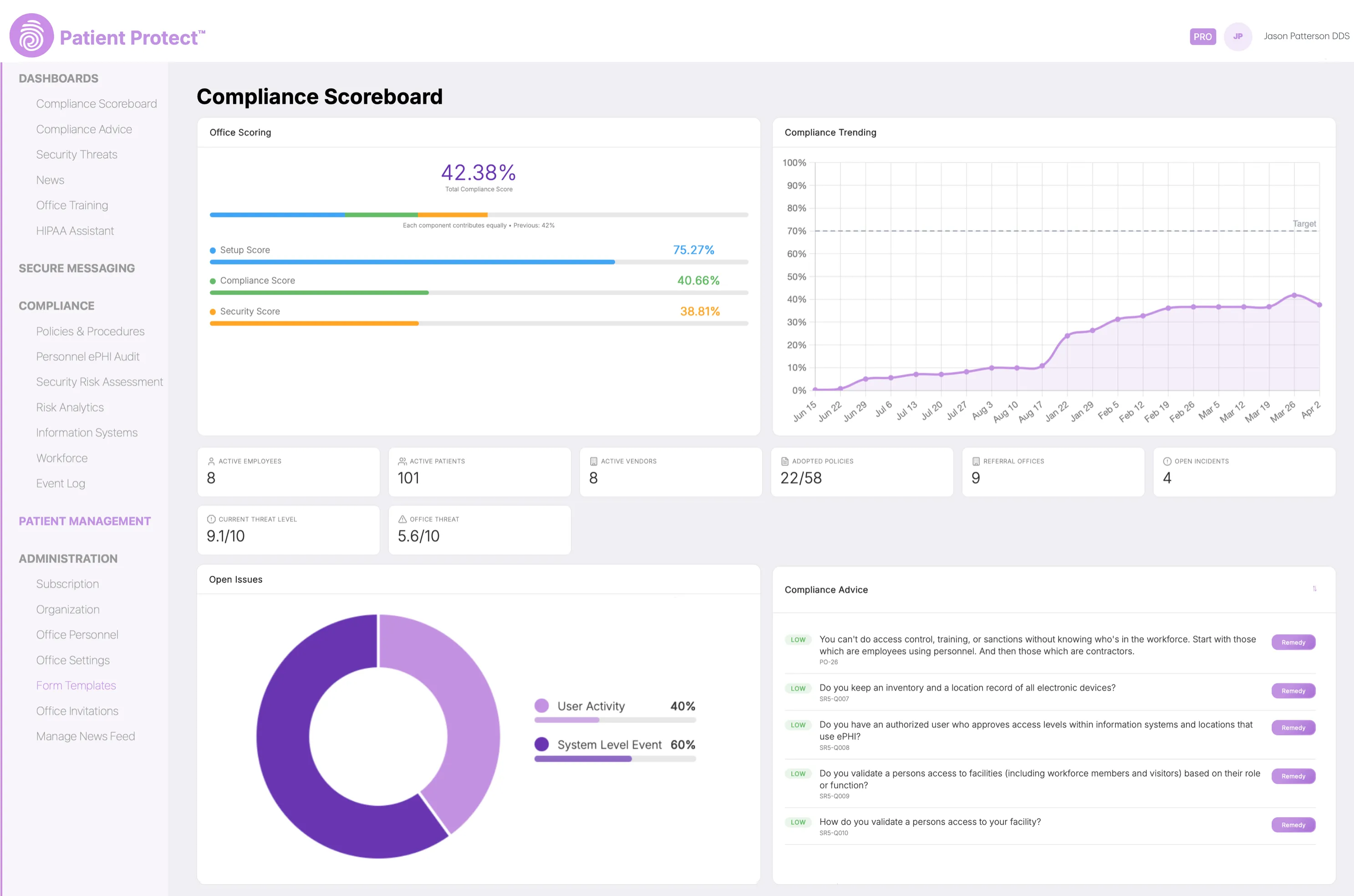
Closing a risk, completing a training module or activating a BAA changes the practice's standing without anyone updating a spreadsheet. The score, the queue and the risk view all read from the same state.
The assessment wizard walks through each step, so a practice can stand the program up alongside an existing compliance partner or on its own.
The complete core platform starts at $39/month per office and covers up to 25 office personnel. No contracts, cancel anytime.
Evaluation checklist
What to ask
Patient Protect
Risk analysis structured to §164.308(a)(1)(ii)(A)
A readiness quiz is not a risk analysis.
Full SRA wizard mapped to NIST CSF with live scoring
Auto-generated policies with workforce acknowledgment
HIPAA requires documented proof your staff reviewed them.
48 policies from your risk profile, versioned acknowledgment
Staff training with delivery tracking
§164.308(a)(5) — sending a PDF is not sufficient.
HIPAA Foundations — 19 modules, 95 assessment questions, verifiable certificates
Full BAA lifecycle management
Expired BAAs are a top enforcement target.
E-signature, renewal alerts, Vendor Risk Scanner
Yes on all 9. Now run the checklist on the rest.
From $39/mo · No long-term contracts.
What HIPAA actually requires
HIPAA asks for administrative, physical and technical safeguards maintained over time rather than filed once. Patient Protect gives each of those a place to be done and a record that it was — though a good deal of the Security Rule is addressed to your organization, and no platform answers it on your behalf.
What the platform does, it records. What remains yours, it says plainly.
Almost everything else follows from that. A compliance tool that does not know who works for you, which systems touch ePHI or which vendors have an agreement can only ever hand you a template. One that does can tell you what to do next, and can show afterwards that you did it.
Configuration is not a setup wizard you get past. The office, its workforce, the roles those people hold, the systems that touch ePHI and the vendors under agreement are the state everything else reads from.
State the platform holds
It knows what the practice has told it. Nothing here discovers a vendor nobody entered.
The 331-item assessment reads from that state rather than starting from a blank form. Its answers become a risk view, and the risk view becomes a single current standing — three different jobs that are easy to collapse and worth keeping apart.
Three distinct jobs
Completing the assessment is the practice's act. An unanswered assessment discharges nothing.
500+ encoded advice and actions sit between the state and the work. The engine surfaces the next thing that matters, offers a route to remedy it, and records an accomplishment when it is done — which changes the state, which changes the advice.
The operating model
Autonomous describes the loop, not the labor. The engine decides what matters next; a person still does the work.
This is the part a document generator cannot reach. Adopting a policy, training the workforce, executing an agreement, sending records to another office — each has a place to be performed rather than a reminder to perform it elsewhere.
Governed work
Digital Forms and Patient Management extend this into patient-facing work, on Pro.
Because the work happened in the system, the record of it is a by-product rather than a separate exercise. That is the difference between having a policy and being able to show when it was adopted and who acknowledged it.
Artifacts produced
Attributable and timestamped where the workflow supports it. We do not claim the record is immutable — that needs storage-layer evidence nobody here can produce.
A practice's own state is only half the picture. The platform also takes in what is happening across healthcare — breaches filed, enforcement taken, advisories issued — and puts it next to the practice's own standing.
External inputs
Daily, not live. And it is intelligence about the sector — not monitoring of your network, your endpoints or your other systems.
Closing a risk changes the risk view. Completing training writes an evidence record and moves the score. Activating a BAA opens a messaging path that was closed a minute earlier. None of those are separate products reporting to a dashboard — they are the same state, read from different angles.
What the platform cannot do is act for you. It will tell you the assessment is stale, and it will not answer it. That boundary is drawn explicitly, provision by provision, on what we handle and what stays yours.
The operating architecture above — the practice model, the assessment, the engine, the evidence, the intelligence — is Basic. Pro extends it toward patient-facing work.
See full pricingFAQ
Patient Protect puts compliance program management and technical controls in one system. Three capabilities define the platform: PIPAA — a HIPAA AI compliance assistant that runs without any third-party cloud LLM (OpenAI, Anthropic, Google), with an air-gapped hardware deployment in development (waitlist available); full BAA lifecycle management with e-signature and renewal tracking; and a breach intelligence dashboard fed by daily HHS OCR data. Whether you already work with a compliance vendor or are starting fresh, Patient Protect adds a security-first layer that closes operational gaps between audits.
Yes. The platform is specifically designed for independent healthcare practices — dental offices, medical practices, behavioral health clinics, and specialty providers — that carry enterprise-grade HIPAA obligations without enterprise-grade resources.
Most practices complete initial setup in under two hours. The SRA wizard guides you through every required assessment step, policies auto-generate from your answers, and BAA templates are ready to send on day one. No consultant required, and no implementation project to schedule.
Pricing varies widely across HIPAA compliance vendors — some charge flat rates, some per employee, some require annual contracts. Patient Protect publishes pricing directly: $39/month for Basic per office (up to 25 office personnel), $99/month for Pro (up to 50). No contracts. Larger practices scale predictably at per-5-personnel add-on rates published on the pricing page. Visit each vendor’s website for their current pricing.
For most independent practices, Patient Protect provides everything you need without a separate consultant. For practices that already work with a compliance advisor, the platform adds continuous monitoring, automated workflows, and built-in training alongside that relationship — giving your consultant better data and your practice stronger controls.
Manual compliance relies on spreadsheets, Word documents, and annual consultant visits. It cannot see configuration drift between reviews, cannot surface an incident as it happens, and produces evidence that rarely satisfies OCR auditors. HIPAA compliance software like Patient Protect automates risk assessments, tracks training completion, monitors BAA status, and documents everything continuously — the difference between saying you’re compliant and proving it.
Next step
Take the free risk assessment. No login required. See exactly where your compliance gaps are — and what it would take to close them.